
 Sponsor


Parquet
Installation
For the installation instructions, read the installation page.
Engine System
- PHP Engine (
PhpParquetEngine): pure PHP. It needs no extra dependencies, only optional compression extensions. - Rust Engine (
RustParquetEngine): the arrow extension registers it. All compression codecs are built in. - Adaptive Engine (
AdaptiveParquetEngine): the default. If the arrow extension is loaded, it usesRustParquetEngine. If not, it usesPhpParquetEngine. A big-endianReaderusesPhpParquetEngine.
<?php

use Flow\Parquet\Reader;
use Flow\Parquet\Writer;

$reader = new Reader();   // AdaptiveParquetEngine
$writer = new Writer();

$reader = Reader::php();
$writer = Writer::php();
Both engines read the same values, and they accept and refuse the same writes. The Arrow engine cannot read these:
INTERVAL, dictionary and view types, LZO, a path into a LIST / MAP. It also cannot read INT96 under
Option::INT_96_AS_DATETIME = false. It refuses them before the first batch, and the message names
\Flow\Parquet\Reader::php().
What is Parquet
Apache Parquet is an open source, column-oriented data file format for efficient data storage and retrieval. It has efficient data compression and encoding schemes for large amounts of complex data. Parquet is available in many languages, for example Java, C++ and Python. It is now also available in PHP.
Columnar Storage
Parquet stores data in a columnar format. This section shows what that means.
Row-based format:
| ID | Name | Age |
|---|---|---|
| 1 | Alice | 20 |
| 2 | Bob | 25 |
| 3 | Carol | 30 |
Column-based format:
| ID | 1 | 2 | 3 |
|---|---|---|---|
| Name | Alice | Bob | Carol |
| Age | 20 | 25 | 30 |
This approach has these advantages:
- Compression: the data is stored in columns, so it compresses better.
- I/O and selective columns: a query on some of the columns can skip the other columns. This helps most with large columns.
- Encoding: each column can use a different encoding scheme, for its data type and the distribution of its values.
- Data skipping: a query on some of the rows can skip the other rows. This helps most with large rows.
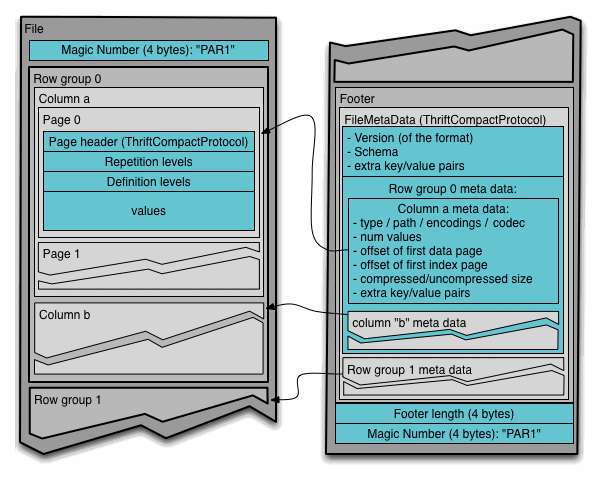
Parquet File Structure
4-byte magic number "PAR1"
<Column 1 Chunk 1 + Column Metadata>
<Column 2 Chunk 1 + Column Metadata>
...
<Column N Chunk 1 + Column Metadata>
<Column 1 Chunk 2 + Column Metadata>
<Column 2 Chunk 2 + Column Metadata>
...
<Column N Chunk 2 + Column Metadata>
...
<Column 1 Chunk M + Column Metadata>
<Column 2 Chunk M + Column Metadata>
...
<Column N Chunk M + Column Metadata>
File Metadata
4-byte length in bytes of file metadata (little endian)
4-byte magic number "PAR1"
Reading Parquet Files
First, create a reader.
use Flow\Parquet\Reader;

$reader = new Reader();
[!TIP]
new Reader()uses the adaptive engine. To choose the Arrow or PHP engine explicitly, read Engine System.
The Reader accepts three arguments:
$byteOrder- by default set toByteOrder::LITTLE_ENDIAN$options- a set of options for the reader configuration.$engine- by defaultAdaptiveParquetEngine
The Option enum describes all available options.
Not all options have an effect on the reader.
Reader Options
INT_96_AS_DATETIME- default:true. Withtrue, the reader readsINT96values asDateTimeImmutable, rounded down to microseconds.
Reading a file
With the reader, read a file.
use Flow\Parquet\Reader;

$reader = new Reader();

$file = $reader->read('path/to/file.parquet');
$file = $reader->readStream(\fopen('path/to/file.parquet', 'rb'));
RustParquetEngine reads the footer at the time that the file opens. PhpParquetEngine reads it on the first call
that needs it. An invalid file throws InvalidArgumentException Given file is not valid Parquet file....
You can read these things from a parquet file:
ParquetFile::values(Query $query = new Query()) : \Generator- rows, one by oneParquetFile::columns(Query $query = new Query(), int $batchSize = 1024) : \Generator- columns, in batchesParquetFile::metadata() : MetadataParquetFile::schema() : Schema- the file schema, without building row-group metadataParquetFile::close() : void- closes the reader and its stream
Reading the whole file:
use Flow\Parquet\Reader;

$reader = new Reader();

$file = $reader->read('path/to/file.parquet');
foreach ($file->values() as $row) {
    // do something with $row
}
Reading selected columns
use Flow\Parquet\Reader;
use function Flow\Parquet\DSL\parquet_query;

$file = (new Reader())->read('path/to/file.parquet');

foreach ($file->values(parquet_query()->select('column_1', 'column_2')) as $row) {
    // ['column_1' => ..., 'column_2' => ...]
}
Pagination
[!NOTE] Pagination over a parquet file is not easy, most of all with low memory usage. For the best results, try different Writer options (described later).
foreach ($file->values(parquet_query()->select('column_1')->offset(1000)->limit(100)) as $row) {
    // rows 1000-1099
}
Reading columns in batches
foreach ($file->columns(parquet_query()->select('column_1', 'column_2'), batchSize: 1000) as $chunk) {
    // ['column_1' => [...up to 1000 values], 'column_2' => [...]]
}
Filtering reads
use Flow\Parquet\Reader;
use function Flow\Parquet\DSL\{parquet_column, parquet_query};

$file = (new Reader())->read('path/to/file.parquet');

$query = parquet_query()
    ->select('id', 'country')
    ->where(
        parquet_column('country')->equals('PL')
            ->and(parquet_column('user.age')->lessThan(18)->negate())
            ->and(parquet_column('status')->in(['new', 'paid'])->or(parquet_column('note')->isNull())),
    )
    ->offset(20)
    ->limit(10);

foreach ($file->values($query) as $row) {
    // only matching rows: the 21st to the 30th match
}
The read returns exactly the rows that match. Offset and limit count matching rows. The statistics (column chunk
statistics, the page index) can prove that no row of a row group or page matches. The engines never read
such a row group or page. Both engines skip the same ones, and they read only the bytes of the pages that they keep. A
second where() narrows the first.
Method on parquet_column($path) |
Filter |
|---|---|
equals, lessThan, lessThanOrEqual, greaterThan, greaterThanOrEqual |
Comparison |
notEquals |
Not of equals |
in(array), notIn(array) |
In, Not of In |
isNull(), isNotNull() |
IsNull, its Not |
startsWith(string) |
StartsWith |
->and(),->or(),->negate()on a filter buildAll,Any,Not.new All(...$filters)andnew Any(...$filters)combine a list (namespaceFlow\Parquet\Filter).$pathnames a leaf through structs ('user.address.city'). A column that the file does not have reads as null. A leaf inside a list or a map is refused (InvalidArgumentException), because a row has no single value there.- The semantics are the same as in SQL: a comparison on null is null,
NOTnull is null, and only true keeps a row. Floats follow IEEE 754 (NaNmatches nothing,-0.0equals0.0). Strings compare in byte order ('10' < '9'),UINT_64values compare as numbers, and date-times compare by instant. A literal of a different kind than the column values (a string on anINT64column) matches nothing, also under->negate(). - Literals: scalars,
DateTimeInterface,Stringable(uuids).null(useisNull()) andNaNare refused. - Files written without
column_orders(older flow-php versions) are never pruned, only filtered. The writer options in Statistics set the statistics of a file.
Reading with a ReadPlan
use Flow\Parquet\Filter\Binding\BoundFilter;
use Flow\Parquet\Reader\ReadPlan;
use function Flow\Parquet\DSL\parquet_column;

$filter = parquet_column('id')->greaterThan(100);
$plan = ReadPlan::forFilter(
    $file->reader()->footer(),
    $file->indexes(),
    BoundFilter::bind($filter, $file->schema(), $file->options()),
    limit: 10,                     // rows kept by $plan->rowFilter, refused unless it is the whole filter
);

foreach ($file->reader()->readColumns(['id'], 1024, $plan) as $batch) {
    // only rows matching $plan->rowFilter
}
ReadPlan::$rowFilter holds the conjuncts that the file compares exactly. The rows that come back match them. If
they are not the full filter, the rows are a superset of the query matches.
Writing Parquet Files
Parquet is a binary format. The writer therefore needs a schema to know how to encode the values in each column.
Create a schema like this:
use Flow\Parquet\ParquetFile\Schema;
use Flow\Parquet\ParquetFile\Schema\FlatColumn;
use Flow\Parquet\ParquetFile\Schema\NestedColumn;

$schema = Schema::with(
    FlatColumn::int64('id'),
    FlatColumn::string('name'),
    FlatColumn::boolean('active'),
    FlatColumn::dateTime('created_at'),
    NestedColumn::list('list_of_int', Schema\ListElement::int32()),
    NestedColumn::map('map_of_int_string', Schema\MapKey::int32(), Schema\MapValue::string()),
    NestedColumn::struct('struct', [
        FlatColumn::int64('id'),
        FlatColumn::string('name'),
        FlatColumn::boolean('active'),
        FlatColumn::dateTime('created_at'),
        NestedColumn::list('list_of_int', Schema\ListElement::int32()),
        NestedColumn::map('map_of_int_string', Schema\MapKey::int32(), Schema\MapValue::string()),
    ])
);
FlatColumn::dateTime() is written as TIMESTAMP(isAdjustedToUTC=true, MICROS). Files with isAdjustedToUTC=false read as UTC wall clock.
With the schema, create a writer.
use Flow\Parquet\Writer;

$writer = new Writer();
[!TIP]
new Writer()usesAdaptiveParquetEngine. UseWriter::php()to select the PHP engine. For more information, read Engine System.
Then write the data:
$writer->write(
    $path,
    $schema,
    [
        [
            'id' => 1,
            'name' => 'Alice',
            ...
        ]
    ]
);
This approach opens a parquet file, creates a group writer, writes all data and closes the file. It keeps the full dataset in memory, which is usually not the best approach.
Writing data in chunks
Before you write a batch of rows, open a file.
$writer->open($path, $schema);
$writer->writeBatch([$row, $row]);
$writer->writeBatch([$row, $row]);
$writer->writeBatch([$row, $row]);
$writer->writeBatch([$row, $row]);
$writer->writeBatch([$row, $row]);
$writer->close();
You can also open a file for a resource:
$writer->openForStream($stream, $schema);
Writing columns
A batch that is already in columns is written without rows: one list for each top-level column, and all lists have the same length. A schema column that the array does not have is written as nulls. A key that the schema does not have is ignored.
$writer->open($path, $schema);
$writer->writeColumns(['id' => [1, 2, 3], 'name' => ['a', 'b', null]]);
$writer->writeColumns(['id' => [4], 'tags' => [['x', 'y']]]);
$writer->close();
The file is the same as the file that writeBatch() writes for the same rows. A value is accepted or refused in the
same way as by writeBatch(). Lists of different lengths are refused:
InvalidArgumentException('writeColumns() takes lists of one length, got "id": 3, "name": 2').
A custom ParquetFileWriter implements writeColumns(array $columns): void and
writeStoredColumns(array $columns): void, a custom ParquetFileReader implements readColumns() and
readStoredColumns(). The stored methods take and return DATE as days since 1970-01-01, TIMESTAMP as microseconds
since the epoch, TIME as microseconds since midnight and UUID as its 16 bytes:
$writer->writeStoredColumns(['day' => [19_782], 'at' => [1_234_567_890_123_456], 'id' => [random_bytes(16)]]);
Writing a single row
$writer->open($path, $schema);
$writer->writeRow($row);
$writer->writeRow($row);
$writer->writeRow($row);
$writer->writeRow($row);
$writer->writeRow($row);
$writer->close();
[!WARNING] Schema evolution is not supported yet. Make sure that the schema is the same as the schema that created the file.
Writer Options
COLUMN_INDEX_TRUNCATE_LENGTH- default:64- the number of bytes to which the column index cuts the min/max of a string/binary page.DICTIONARY_ENABLED- default:true- columns without aCOLUMNS_ENCODINGSentry are writtenRLE_DICTIONARY. The exceptions are BOOLEAN and, underWRITER_VERSION1, FIXED_LEN_BYTE_ARRAY (as in arrow-rs and parquet-java).falsewrites the fallback encoding instead.DICTIONARY_PAGE_SIZE- default:1Mb- maximum size of a dictionary page. After the dictionary page reaches this size, the next pages of the column chunk use the fallback encoding.GZIP_COMPRESSION_LEVEL- default:9- compression level for GZIP compression. It applies only to GZIP compression.COLUMNS_BLOOM_FILTERS- default:null-BloomFilterOptionsby column flat path. Those columns get a bloom filter for each row group (Bloom filters).PAGE_HEADER_STATISTICS- default:false- data page headers carry the statistics of the page (atStatisticsLevel::PAGE).PAGE_MAXIMUM_ROWS_COUNT- default:1000- rows for each data page. The PHP writer closes a page at exactly that number. The arrow writer uses it as a target, and checks it between write batches, so its pages can hold more rows. With smaller pages, the page index can skip more of a filtered read.PAGE_SIZE_BYTES- default:128Kb- maximum size of a data page.ROW_GROUP_MAXIMUM_ROWS_COUNT- default:1048576- maximum rows for each row group. Both engines close a row group at exactly that number, or earlier atROW_GROUP_SIZE_BYTES.ROW_GROUP_SIZE_BYTES- default:32Mb- maximum size of a row group.ROW_GROUP_SIZE_CHECK_INTERVALdefault:1000- the number of rows that the writer writes between two checks of the row group size limit.STATISTICS_LEVEL- default:StatisticsLevel::PAGE-NONE,CHUNK(column chunk statistics) orPAGE(also a column index). The offset index is written at each level.STATISTICS_TRUNCATE_LENGTH- default:64- the number of bytes to which the writer cuts the min/max statistics of a string/binary column chunk.VALIDATE_DATA- default:true- withtrue, the writer makes sure that the data matches the schema.WRITER_VERSION- default1-2writes data page v2. It also picks the fallback encoding without a dictionary. Under1, it isPLAIN. Under2, it isRLE(BOOLEAN),DELTA_BINARY_PACKED(INT32/INT64),DELTA_BYTE_ARRAY(BYTE_ARRAY/FIXED_LEN_BYTE_ARRAY), andPLAINfor the other types, as in arrow-rs and parquet-java.
The three most important options for memory usage are:
ROW_GROUP_MAXIMUM_ROWS_COUNTROW_GROUP_SIZE_BYTESROW_GROUP_SIZE_CHECK_INTERVAL
The row group size sets how much data the writer (and also the reader) keeps in memory before it flushes the data to the file. The row group size check interval sets how often the writer checks the row group size limit. With a value that is too high, the writer can go over the row group size limit.
Common row group sizes are 128-512 MB. This is good for big data and fast processing in memory, but not for PHP.
For example, you paginate over a file with 1Gb of data, and the row group size is 512Mb. You then keep at least 512Mb of data in memory at one time.
A much better approach is a row group size near 1Mb. Set the row group size check interval to your default page size, for example 100 or 500. The correct value depends on your data.
You then keep memory usage low, and you can paginate over big files without problems. But the write to these files takes a little longer, because the writer flushes and calculates statistics more frequently.
No one value is correct for all cases. Try different values to find the best one for your use case.
Statistics
Both engines write the same column chunk statistics as arrow-rs: min_value/max_value with exactness flags,
nan_count for floats and a column order for each leaf.
<?php

use Flow\Parquet\{Option, Options, Reader, Writer};

(new Writer(options: Options::default()->set(Option::STATISTICS_TRUNCATE_LENGTH, 16)))
    ->write(__DIR__ . '/orders.parquet', $schema, $rows);

$metadata = (new Reader())->read(__DIR__ . '/orders.parquet')->metadata();
$column = $metadata->schema()->getFlat('customer');

foreach ($metadata->rowGroups()->all() as $rowGroup) {
    $statistics = $rowGroup->getColumnChunk($column)->statistics();

    $statistics?->minValue($column);        // physical value: bytes for strings, unscaled int for decimal(10, 2)
    $statistics?->maxValue($column);
    $statistics?->isMaxValueExact;          // false when the max was truncated and incremented
    $statistics?->nullCount;
    $statistics?->nanCount;                 // FLOAT, DOUBLE and FLOAT16 only
}

$metadata->columnOrder($column);            // ColumnOrder::TypeDefined; ColumnOrder::Absent in files written before it
| Physical type | Order of min_value/max_value |
|---|---|
| BYTE_ARRAY, FIXED_LEN_BYTE_ARRAY | unsigned bytes ('10' < '9') |
| DECIMAL | signed (two's complement bytes, or the unscaled INT32/INT64) |
INT32/INT64 UINT_* |
unsigned |
| FLOAT, DOUBLE, FLOAT16 | IEEE 754 total order (-0.0 < 0.0), NaN counted. NaN is a bound only for all-NaN values |
| INT96, INTERVAL | none: no min_value/max_value is written |
Strings and binaries longer than STATISTICS_TRUNCATE_LENGTH keep a prefix as the min, and an incremented prefix as
the max. Decimals and FLOAT16 are never truncated.
Page index
By default, both writers write a column index and an offset index. The column index has the min, max, null and NaN counts of each page. The offset index has the start of each page and its first row. Pages start on row boundaries, also in lists.
<?php

use Flow\Parquet\{Option, Options, Reader, Writer};
use Flow\Parquet\Writer\StatisticsLevel;

(new Writer(options: Options::default()->set(Option::STATISTICS_LEVEL, StatisticsLevel::CHUNK)))
    ->write(__DIR__ . '/orders.parquet', $schema, $rows);   // no column index; NONE also drops chunk statistics

$file = (new Reader())->read(__DIR__ . '/orders.parquet');
$column = $file->schema()->getFlat('customer');

$file->indexes()->columnIndex(0, $column);       // ?ColumnIndex of row group 0: nullPages, minValues, maxValues, ...
$file->indexes()->offsetIndex(0, $column);       // ?OffsetIndex: pages[i]->offset, compressedPageSize, firstRowIndex
Bloom filters
With a bloom filter for each column chunk, a read can skip the row groups that cannot hold a value. Min/max cannot
do this for some values, for example an id inside the range of each group. Only equals() and in() use bloom
filters. Both writers write them after each row group, only for the configured columns.
<?php

use Flow\Parquet\{Option, Options, Reader, Writer};
use Flow\Parquet\BloomFilter\BloomFilterOptions;
use function Flow\Parquet\DSL\{parquet_column, parquet_query};

(new Writer(options: Options::default()->set(Option::COLUMNS_BLOOM_FILTERS, [
    'id' => new BloomFilterOptions(),                  // fpp 0.05, ndv 1 048 576 (the arrow-rs defaults)
    'user.email' => new BloomFilterOptions(0.01, 10_000),
])))->write(__DIR__ . '/users.parquet', $schema, $rows);

(new Reader())->read(__DIR__ . '/users.parquet')
    ->values(parquet_query()->select('id')->where(parquet_column('id')->in([42, 1337])));
Compressions
[!NOTE] With the Arrow engine, all compression codecs are built into the extension. Only the PHP engine needs the PHP compression extensions below.
Parquet supports these compression algorithms:
BROTLI- needs the Brotli ExtensionGZIP- supported by defaultLZ4- needs the LZ4 ExtensionLZ4_RAW- needs the LZ4 ExtensionLZO- not supported yetSNAPPY- supported. Install the Snappy Extension. Without it, a php implementation runs, which is much slower than the extensionUNCOMPRESSED- supported by defaultZSTD- needs the ZSTD Extension
Compression is a trade-off between speed and size.
For the smallest files, use ZSTD or BROTLI. SNAPPY is the default because it is fast.
Our Roadmap shows the plan for the algorithms that are not supported yet.
Per-Column Compression
You can set a different compression algorithm for each column with flat path notation. This gives you fine control over the compression for storage and performance.
When to Use Per-Column Compression
Different types of data need different compression strategies:
- Fast access columns (IDs, timestamps): use
UNCOMPRESSEDorLZ4for minimal decompression overhead - Categorical data (status, country codes): use
SNAPPYfor balanced compression with good performance - Text/JSON data (descriptions, metadata): use
ZSTDorBROTLIfor maximum compression - Numerical data: use
LZ4orSNAPPYfor good compression with fast access - Archival columns: use
ZSTDfor maximum compression, for data with less need of access speed
Basic Per-Column Compression
use Flow\Parquet\{Writer, Options, Option};
use Flow\Parquet\ParquetFile\{Schema, Compressions};
use Flow\Parquet\ParquetFile\Schema\FlatColumn;

$schema = Schema::with(
    FlatColumn::int64('user_id'),
    FlatColumn::string('status'),
    FlatColumn::string('description'),
    FlatColumn::float('price')
);

$options = Options::default()->set(Option::COLUMNS_COMPRESSIONS, [
    'user_id' => Compressions::UNCOMPRESSED,     // Fast access for frequent queries
    'status' => Compressions::SNAPPY,            // Balanced compression for enum-like data
    'description' => Compressions::ZSTD,         // Maximum compression for text data
    'price' => Compressions::LZ4                 // Fast compression for numeric data
]);

// Global compression serves as fallback for unspecified columns
$writer = new Writer(compression: Compressions::GZIP, options: $options);
Nested Column Compression
For nested structures, use the same flat path notation as for column encodings:
use Flow\Parquet\ParquetFile\Schema\{NestedColumn, ListElement, MapKey, MapValue};

$schema = Schema::with(
    NestedColumn::struct('user', [
        FlatColumn::int64('id'),
        FlatColumn::string('name'),
        NestedColumn::struct('address', [
            FlatColumn::string('street'),
            FlatColumn::string('city'),
            FlatColumn::string('country')
        ])
    ]),
    NestedColumn::list('tags', ListElement::string()),
    NestedColumn::map('metadata', MapKey::string(), MapValue::string())
);

$options = Options::default()->set(Option::COLUMNS_COMPRESSIONS, [
    // Struct fields - direct access
    'user.id' => Compressions::UNCOMPRESSED,           // Primary key - fast access
    'user.name' => Compressions::SNAPPY,               // Balanced for names
    'user.address.street' => Compressions::ZSTD,       // High compression for addresses
    'user.address.city' => Compressions::LZ4,          // Fast for frequently queried cities
    'user.address.country' => Compressions::SNAPPY,    // Balanced for country codes

    // List elements - note the '.list.element' suffix
    'tags.list.element' => Compressions::BROTLI,       // High compression for tags

    // Map key/value pairs - note the '.key_value.key/value' suffix
    'metadata.key_value.key' => Compressions::LZ4,     // Fast access for metadata keys
    'metadata.key_value.value' => Compressions::ZSTD   // Max compression for metadata values
]);
Performance-Optimized Strategies
Query-Optimized Strategy:
$options = Options::default()->set(Option::COLUMNS_COMPRESSIONS, [
    // Frequently queried columns - prioritize speed
    'user_id' => Compressions::UNCOMPRESSED,
    'created_at' => Compressions::LZ4,
    'status' => Compressions::SNAPPY,

    // Analytical columns - prioritize compression
    'analytics_payload' => Compressions::ZSTD,
    'raw_data' => Compressions::BROTLI,

    // Balanced approach for mixed usage
    'category' => Compressions::SNAPPY,
    'description' => Compressions::GZIP
]);
Storage-Optimized Strategy:
$options = Options::default()->set(Option::COLUMNS_COMPRESSIONS, [
    // Only critical columns use fast compression
    'id' => Compressions::LZ4,

    // Everything else maximizes compression
    'content' => Compressions::ZSTD,
    'metadata' => Compressions::BROTLI,
    'tags' => Compressions::GZIP,
    'attributes' => Compressions::ZSTD
]);
Combined Compression and Encoding Strategy
You can combine compression for each column with custom encodings:
$options = Options::default()
    ->set(Option::COLUMNS_COMPRESSIONS, [
        'user_id' => Compressions::UNCOMPRESSED,          // Fast primary key access
        'status' => Compressions::SNAPPY,                 // Balanced for enum data
        'metadata' => Compressions::ZSTD                  // Max compression for JSON
    ])
    ->set(Option::COLUMNS_ENCODINGS, [
        'user_id' => Encodings::DELTA_BINARY_PACKED,      // Efficient encoding for sequential IDs
        'status' => Encodings::RLE_DICTIONARY,            // Dictionary for repeated values
        'metadata' => Encodings::PLAIN                    // No encoding overhead for compressed data
    ]);
Compression Selection Guidelines
| Data Type | Characteristics | Recommended Compression | Use Case |
|---|---|---|---|
| Primary Keys | Sequential integers, frequent queries | UNCOMPRESSED or LZ4 |
Fast joins and lookups |
| Status/Categories | Low cardinality, repeated values | SNAPPY |
Balanced performance |
| Timestamps | Sequential, frequently filtered | LZ4 |
Fast time-based queries |
| Text Content | High variance, large size | ZSTD or BROTLI |
Storage optimization |
| JSON/Metadata | Complex nested data | ZSTD |
Maximum compression |
| Numerical Data | Calculations, aggregations | SNAPPY or LZ4 |
Fast mathematical operations |
| Archive Data | Rarely accessed | ZSTD or BROTLI |
Long-term storage |
Performance vs. Compression Trade-offs
Compression Ratio (Best to Worst):
ZSTD: best compression, slower decompressionBROTLI: very good compression, moderate speedGZIP: good compression, widely supportedSNAPPY: balanced compression and speed (default)LZ4: fast compression/decompression, moderate ratioUNCOMPRESSED: no compression overhead, largest size
Decompression Speed (Fastest to Slowest):
UNCOMPRESSED: no decompression necessaryLZ4: very fast decompressionSNAPPY: fast decompression (good balance)GZIP: moderate decompression speedBROTLI: slower decompressionZSTD: configurable, usually slower for high compression
Column Encodings
Parquet supports different column encoding algorithms. They have a large effect on file size and query performance. You can set a custom encoding for each column with flat path notation.
Available Encodings
Without a COLUMNS_ENCODINGS entry, both engines write RLE_DICTIONARY (read DICTIONARY_ENABLED). After
DICTIONARY_PAGE_SIZE, they write the WRITER_VERSION fallback encoding.
PLAIN
Stores the values as they are, without a compression scheme.
When to use:
- Small datasets, where the compression overhead gives no benefit
- Columns with high cardinality and random distribution
- Maximum compatibility with other Parquet readers
Supported types: All column types
use Flow\Parquet\{Options, Option};
use Flow\Parquet\ParquetFile\Encodings;

$options = Options::default()->set(Option::COLUMNS_ENCODINGS, [
    'description' => Encodings::PLAIN,
    'uuid' => Encodings::PLAIN
]);
RLE_DICTIONARY
Run Length Encoding with Dictionary compression. The values go into a dictionary, and indices replace them.
When to use:
- Columns with low cardinality (many repeated values)
- String columns with repeated categories (status, country, department)
- Enumeration-like data
- Significant file size reduction (often 50-90% smaller)
Supported types: all types except BOOLEAN. FIXED_LEN_BYTE_ARRAY only under WRITER_VERSION 2.
$options = Options::default()->set(Option::COLUMNS_ENCODINGS, [
    'status' => Encodings::RLE_DICTIONARY,          // 'active', 'inactive', 'pending'
    'country_code' => Encodings::RLE_DICTIONARY,    // 'US', 'UK', 'DE', 'FR'
    'department' => Encodings::RLE_DICTIONARY       // 'engineering', 'sales', 'marketing'
]);
Past DICTIONARY_PAGE_SIZE, the rest of the chunk uses the WRITER_VERSION fallback encoding (PLAIN under v1).
DELTA_BINARY_PACKED
Delta encoding with binary packing for integer columns. It stores the differences between consecutive values.
When to use:
- Sequential or monotonic integer data (IDs, timestamps, counters)
- Time series data with incremental values
- Can achieve 70-95% compression for sequential data
Supported types: Only INT32 and INT64
$options = Options::default()->set(Option::COLUMNS_ENCODINGS, [
    'user_id' => Encodings::DELTA_BINARY_PACKED,     // 1, 2, 3, 4, 5...
    'timestamp_ms' => Encodings::DELTA_BINARY_PACKED, // 1634567890123, 1634567890124...
    'order_number' => Encodings::DELTA_BINARY_PACKED  // Sequential order IDs
]);
DELTA_LENGTH_BYTE_ARRAY
Supported types: Only BYTE_ARRAY
$options = Options::default()->set(Option::COLUMNS_ENCODINGS, [
    'comment' => Encodings::DELTA_LENGTH_BYTE_ARRAY,
]);
When to use: many distinct strings.
DELTA_BYTE_ARRAY
Supported types: BYTE_ARRAY and FIXED_LEN_BYTE_ARRAY
$options = Options::default()->set(Option::COLUMNS_ENCODINGS, [
    'url' => Encodings::DELTA_BYTE_ARRAY,
]);
When to use: sorted strings sharing prefixes.
Using Custom Encodings
Both engines write exactly the given encoding. They refuse an encoding that the column type cannot take. Only
RLE_DICTIONARY adds a dictionary.
Basic Column Encoding
use Flow\Parquet\{Writer, Options, Option};
use Flow\Parquet\ParquetFile\{Schema, Compressions, Encodings};
use Flow\Parquet\ParquetFile\Schema\FlatColumn;

$schema = Schema::with(
    FlatColumn::int64('user_id'),
    FlatColumn::string('status'),
    FlatColumn::string('description')
);

$options = Options::default()->set(Option::COLUMNS_ENCODINGS, [
    'user_id' => Encodings::DELTA_BINARY_PACKED,  // Sequential IDs
    'status' => Encodings::RLE_DICTIONARY,        // Limited set of values
    'description' => Encodings::PLAIN             // High variance text
]);

$writer = new Writer(compression: Compressions::SNAPPY, options: $options);
Nested Column Encoding (Flat Path Notation)
For nested structures, use dot notation to give the exact column path. The flat path follows the internal structure conventions of Parquet:
Flat Path Patterns:
- Struct fields:
parent.field_name - List elements:
list_name.list.element - Map keys:
map_name.key_value.key - Map values:
map_name.key_value.value
use Flow\Parquet\ParquetFile\Schema\{NestedColumn, ListElement, MapKey, MapValue};

$schema = Schema::with(
    NestedColumn::struct('user', [
        FlatColumn::int64('id'),
        FlatColumn::string('name'),
        NestedColumn::struct('address', [
            FlatColumn::string('street'),
            FlatColumn::string('city'),
            FlatColumn::string('country')
        ])
    ]),
    NestedColumn::list('tags', ListElement::string()),
    NestedColumn::map('metadata', MapKey::string(), MapValue::string())
);
Understanding Flat Paths:
// STRUCT: Direct field access with dot notation
'user.id'              // user struct → id field
'user.name'            // user struct → name field
'user.address.street'  // user struct → address struct → street field
'user.address.city'    // user struct → address struct → city field
'user.address.country' // user struct → address struct → country field

// LIST: Always includes intermediate '.list.element' structure
'tags.list.element'    // tags list → list wrapper → element (the actual string values)

// MAP: Always includes intermediate '.key_value' structure
'metadata.key_value.key'   // metadata map → key_value wrapper → key (string keys)
'metadata.key_value.value' // metadata map → key_value wrapper → value (string values)
Applying Custom Encodings:
$options = Options::default()->set(Option::COLUMNS_ENCODINGS, [
    // Struct fields - direct access
    'user.id' => Encodings::DELTA_BINARY_PACKED,
    'user.name' => Encodings::RLE_DICTIONARY,
    'user.address.street' => Encodings::PLAIN,
    'user.address.city' => Encodings::RLE_DICTIONARY,
    'user.address.country' => Encodings::RLE_DICTIONARY,

    // List elements - note the '.list.element' suffix
    'tags.list.element' => Encodings::RLE_DICTIONARY,

    // Map key/value pairs - note the '.key_value.key/value' suffix
    'metadata.key_value.key' => Encodings::RLE_DICTIONARY,
    'metadata.key_value.value' => Encodings::PLAIN
]);
Complex Nested Example:
// Complex nested structure with lists of structs and maps
$schema = Schema::with(
    NestedColumn::list('orders', ListElement::structure([
        FlatColumn::int64('order_id'),
        FlatColumn::string('status'),
        NestedColumn::map('attributes', MapKey::string(), MapValue::string())
    ]))
);

$options = Options::default()->set(Option::COLUMNS_ENCODINGS, [
    // List of structs: list_name.list.element.field_name
    'orders.list.element.order_id' => Encodings::DELTA_BINARY_PACKED,
    'orders.list.element.status' => Encodings::RLE_DICTIONARY,

    // Map inside list element: list_name.list.element.map_name.key_value.key/value
    'orders.list.element.attributes.key_value.key' => Encodings::RLE_DICTIONARY,
    'orders.list.element.attributes.key_value.value' => Encodings::PLAIN
]);
Mixed Encoding Strategy
$options = Options::default()->set(Option::COLUMNS_ENCODINGS, [
    // High cardinality sequential data
    'order_id' => Encodings::DELTA_BINARY_PACKED,
    'created_timestamp' => Encodings::DELTA_BINARY_PACKED,

    // Low cardinality categorical data
    'order_status' => Encodings::RLE_DICTIONARY,
    'payment_method' => Encodings::RLE_DICTIONARY,
    'shipping_country' => Encodings::RLE_DICTIONARY,

    // High variance descriptive data
    'customer_notes' => Encodings::PLAIN,
    'product_description' => Encodings::PLAIN
]);
Encoding Compatibility
| Encoding | INT32/INT64 | BYTE_ARRAY | BOOLEAN | FLOAT/DOUBLE | FIXED_LEN_BYTE_ARRAY |
|---|---|---|---|---|---|
| PLAIN | yes | yes | yes | yes | yes |
| RLE | no | no | yes | no | no |
| RLE_DICTIONARY | yes | yes | no | yes | v2 only |
| DELTA_BINARY_PACKED | yes | no | no | no | no |
| DELTA_LENGTH_BYTE_ARRAY | no | yes | no | no | no |
| DELTA_BYTE_ARRAY | no | yes | no | no | yes |
Performance Guidelines
- Analyze your data first: look at the cardinality and the distribution patterns.
- Use RLE_DICTIONARY for categorical data: countries, statuses, departments.
- Use DELTA_BINARY_PACKED for sequential integers: IDs, timestamps, counters.
- Use PLAIN for high-variance data: descriptions, UUIDs, random data.
- Test different combinations: measure the file size and the query performance.
- Think about the query patterns: dictionary encoding helps columns that are frequently filtered.
Found a typo or an outdated section? Edit this page on GitHub

